Buying Guide: Analog Fat Shark Receiver Module Adapter V3.0 PLUS
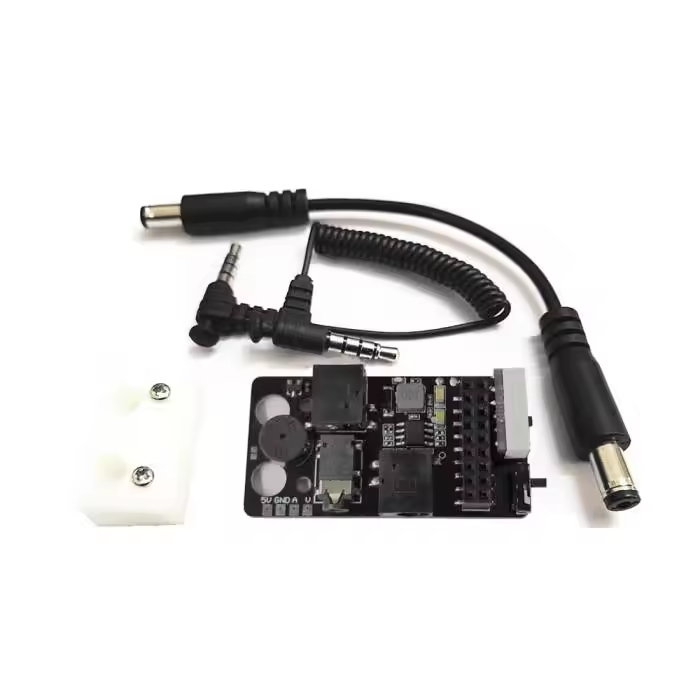
The Analog Fat Shark Receiver Module Adapter V3.0 Plus is designed for pilots who already own DJI FPV Goggles V1 or V2 but still fly analog Tiny Whoops, race quads or older FPV aircraft. It provides a standard Fat Shark-style receiver-module socket, powers the receiver and sends its analog AV output into the goggles.
It is important to understand what the product does not include. The adapter is not a 5.8GHz receiver, does not include antennas and does not convert an analog quad into a DJI digital system. The image remains a standard-definition analog feed displayed through the goggles' AV-IN function.
Compatibility: DJI FPV Goggles V1 and DJI FPV Goggles V2 only. DJI Goggles 2, Goggles Integra, Goggles 3 and Goggles N3 are not compatible.
MEPSKING Expert Review: Simple and Practical Side Mounting
In the supplied hands-on installation, the Receiver Module Adapter side-mounted adapter was secured using two existing screws on the goggles. Foam pads were placed between the board and headset to reduce the risk of scratching, after which the power splitter and AV cable were connected.
Once powered, the DJI goggles and an ImmersionRC RapidFIRE module started simultaneously. The test setup drew approximately 0.6A with the goggles alone and about 0.8A with the analog receiver connected. This was one specific setup rather than a universal consumption figure, but it confirms that an active receiver module will noticeably reduce battery runtime.
Installation was straightforward and did not require soldering or access to the goggles' internal electronics. The side position also prevented the main power connector from being disconnected accidentally during use and left the front faceplate available for compatible digital patch antennas.
The RapidFIRE cover did not lock securely in that particular adapter sample, so the reviewer recommended using a small zip tie. A Furious True-D-style module produced a neater fit. Module retention should therefore be checked before every flight, especially when using large antennas.
MEPSKING verdict: The V3.0 Plus is a practical value upgrade for DJI V1/V2 owners who fly analog occasionally. It is easy to install and inexpensive, but the receiver module, antennas and side-mounted weight must be considered before buying.
Real-World Use Experience
The strongest reason to buy the V3.0 Plus is convenience. A pilot can finish a digital flight, switch the goggles to AV-IN and then fly an analog Tiny Whoop without changing headsets.
The V3.0 Plus also adds useful controls that were missing from simpler adapters. The physical power switch allows the analog receiver to be turned off during digital flights, while the voltage display and configurable alarm make it easier to monitor the shared goggle battery.
There are several practical compromises. The receiver and antennas add weight to one side of the goggles, the external cables require basic management, and a large receiver cover can make the installation feel bulky. DJI FPV Goggles V2 may also need to be switched to DJI Digital FPV System mode before AV-IN becomes available.
Analog image quality remains limited by the FPV camera, video transmitter, receiver module, antennas and RF environment. The adapter routes the signal into the goggles but does not increase receiver sensitivity, transmission power or usable range.
For pilots who fly analog only occasionally, these compromises are usually reasonable. Pilots who fly analog every day may prefer dedicated FPV goggles with an integrated receiver and DVR.
What Else Do You Need?
| Required Item | Included? | Purchase Note |
|---|
| V3.0 Plus Adapter Board | Yes, with V3.0 Plus options | Do not select the aluminum-cover-only option if you need the electronics |
| DJI FPV Goggles V1 or V2 | No | Goggles 2, Integra, Goggles 3 and N3 are not compatible |
| 5.8GHz Analog Receiver Module | No | Choose a compatible Fat Shark-style module such as RapidFIRE or TBS Fusion |
| Receiver Antennas | No | Match the connector and polarization used by the analog aircraft |
| 2S–4S Power Battery | No | Use a DC 5.5 × 2.1mm-compatible power cable |
| Aluminum Module Cover | Option-dependent | Select the combination option when you need both the board and cover |
Purchase warning: Adapter only. The analog receiver module, receiver antennas, power battery and DJI goggles are not included.
Analog Fat Shark Receiver Module Adapter V3.0 Plus vs BDI Digidapter vs Analog Goggles
| Option | Main Advantage | Choose It When |
|---|
| Analog Fat Shark Receiver Module Adapter V3.0 Plus | Affordable side mounting with voltage display and power switch | You occasionally fly analog and want to keep the front faceplate free |
| BDI Digidapter | Cleaner integrated appearance and secure front module bay | Fit, module retention and finished appearance matter more than price |
| Dedicated Analog Goggles | Receiver, display and DVR can be integrated into one independent headset | You fly analog frequently or do not already own DJI FPV Goggles V1/V2 |
The V3.0 Plus is the strongest value when you already own compatible DJI goggles and fly analog occasionally. The BDI Digidapter offers a cleaner and more integrated installation, but normally costs more and occupies the front-face area.
Dedicated analog goggles are the better purchase when analog is your primary video system. Products such as the EV800D analog goggles include the receiver, display and DVR in one ready-to-use headset.
Installation Notes
Confirm that the goggles are DJI FPV Goggles V1 or V2.
Install the supplied foam pads between the adapter and goggles to prevent scratches.
Secure the bracket with the existing side head-strap screws without overtightening them.
Connect the power splitter and 3.5mm AV cable before installing the receiver.
Install two suitable antennas before powering the analog receiver module.
Switch DJI FPV Goggles V2 to DJI Digital FPV System mode and then enable AV-IN.
Set the low-voltage alarm according to the connected battery type.
Secure the receiver or cover with a zip tie if there is visible movement.
Turn the analog receiver off when returning to digital FPV operation.
Never power a receiver module without its antennas attached.
Final Buying Recommendation
Buy the Analog Fat Shark Receiver Module Adapter V3.0 Plus if you already own DJI FPV Goggles V1 or V2 and want an affordable way to fly analog Tiny Whoops, race quads or older 5.8GHz models without purchasing another headset.
Choose the V3.0 Plus board option if you already have a compatible enclosure. Choose the aluminum-cover-only option only when you already own the required adapter electronics. Choose the V3.0 Plus and aluminum-cover combination when starting from scratch and wanting the most complete installation.
Do not buy this product if you use DJI Goggles 2, Integra, Goggles 3 or N3. It is also not the best-value option if you still need to buy an expensive receiver, antennas and battery but plan to fly analog regularly—in that case, compare the total cost with complete analog goggles.











 Verified