
FPV freestyle tricks become much easier when you stop treating them as isolated stick moves. Every clean trick has the same basic structure: create space, set the quad’s attitude, manage momentum while the thrust vector changes, and recover to a deliberate exit line.
The best progression for a new freestyle pilot is:
- Learn Acro mode, coordinated turns, throttle control, and recovery.
- Practice snap rolls, flips, and controlled yaw spins.
- Add Split-S turns, power loops, Immelmann turns, and dives.
- Learn inverted references before attempting Matty flips or trippy spins.
- Build flow by linking the exit of one maneuver to the entry of the next.
This FPV freestyle tutorial uses a Mode 2 radio layout: throttle and yaw are on the left stick; pitch and roll are on the right stick. Mirror left and right inputs if you prefer the opposite direction.
Quick answer: Start in a simulator, fly in Acro/Rate mode, and learn the roll and backflip before the Split-S and power loop. Do not begin with object-based tricks. A beginner is ready to move a trick outdoors only after completing at least 16 clean simulator attempts out of 20 with controlled exits and no panic recovery.
What Is FPV Freestyle Flying?
FPV freestyle is manual, creative quadcopter flying built around lines, tricks, proximity, and control of momentum. Unlike racing, the goal is not simply the shortest lap time. Unlike stabilized camera-drone flying, the aircraft does not automatically return to level when the pilot centers the pitch and roll sticks.
Betaflight calls this default non-leveling behavior Rate mode, commonly known as Acro mode. Centering the pitch or roll stick commands zero rotation, not a level attitude. The quad therefore holds its current angle until the pilot commands another rotation. That behavior is what makes flips, rolls, inverted transitions, and flowing lines possible. If you are still choosing firmware, this Betaflight vs. INAV vs. ArduPilot comparison explains why Betaflight is usually the practical choice for manual freestyle.
If you’re still deciding on parts or planning your first freestyle build, these guides will help you get started the right way:
- 👉 Read this guide to help you choose the best parts for a 5-inch freestyle FPV drone
- 👉 Follow this step-by-step guide to building and flying a 5-inch freestyle FPV drone
Once you understand the basics, you can also browse the FPV parts section in our store to compare frames, motors, ESCs, and props, and pick the freestyle components that best match your flying style and trick goals.

Before You Learn FPV Drone Tricks
Use Acro Mode, Not Angle Mode
Angle mode self-levels when the sticks return to center. Horizon mode blends self-leveling near center with greater rotational authority at larger stick deflections. Both can help with early orientation practice, but they change the recovery behavior used in freestyle.
Learn freestyle in Acro/Rate mode. If full Acro feels overwhelming, Betaflight’s Acro Trainer can temporarily limit bank angle while preserving Acro-style stick behavior. Airmode is also commonly used because it maintains PID authority at low or zero throttle, which helps the quad remain controllable while unloading the props during a flip, roll, or dive. Before flying, use the Betaflight receiver, mode, and failsafe setup guide to verify the control path with the props removed.
Pass This Readiness Check FirstXQ
Use these practical benchmarks before practicing tricks around real objects. They are training gates, not scientific standards or manufacturer limits.
- Fly two minutes of smooth figure eights in Acro mode without an uncontrolled climb or descent.
- Hold a straight line, then stop the rotation cleanly after left and right 90-degree rolls.
- Perform ten throttle-cut-and-catch drills at safe altitude without a panic punch.
- Recover from nose-up, nose-down, left-bank, and right-bank attitudes without switching to Angle mode.
- Disarm immediately and intentionally when a crash is unavoidable.
If any item is inconsistent, spend another session on fundamentals. Skipping this stage usually creates more broken props, not faster progress. The FPV simulator guide for beginners can help you select a simulator and connect a real radio.
Check the Quad Before Every Session
Freestyle adds repeated shock loads and rapid throttle changes. Before installing a flight battery, check the following:
- No cracked arms, loose stack screws, or damaged motor wires.
- Props have no cracks, whitening, deep chips, or bent hubs.
- Prop nuts are tight and the props match the configured motor direction.
- Motors rotate smoothly by hand without grit, bell contact, or excessive bearing play.
- The flight battery cannot slide forward, backward, or into a prop.
- The VTX and receiver antennas are secure and undamaged.
- The arm switch, beeper, link-quality display, and failsafe behavior are known.
Betaflight’s safety guidance is simple: remove the propellers for configuration, firmware flashing, receiver checks, and any bench test where arming could occur. Betaflight’s default Stage 2 failsafe procedure is Drop, which disarms the aircraft; confirm your actual configuration with the props removed before relying on it. If inspection shows a mismatch or damaged part, confirm the correct FPV motor size and appropriate FPV propeller before replacing hardware.
Beginner Betaflight Rates and Camera Angle
Rates control how stick position maps to angular velocity. They do not make a pilot smoother by themselves, and copying a professional pilot’s numbers rarely fixes poor timing.
Betaflight’s Actual rates model is beginner-friendly because Center Sensitivity and Max Rate are expressed directly in degrees per second. The official Betaflight rate guide notes that freestyle pilots commonly use a soft center with maximum rates around 850 to 1,200 degrees per second. That range is descriptive, not a requirement. A new pilot may learn more cleanly at 700 to 850 degrees per second, then increase the maximum only when full-stick rotations feel too slow.
A reasonable starting profile for a beginner freestyle quad is:
| Setting | Starting Range | What It Changes |
| Actual Center Sensitivity | 90-140 deg/s | Precision near center stick |
| Roll Max Rate | 700-850 deg/s | Full-stick roll speed |
| Pitch Max Rate | 650-800 deg/s | Full-stick flip speed |
| Yaw Max Rate | 550-700 deg/s | Full-stick yaw speed |
| Expo | 0.20-0.35 | Softens the transition away from center |
| Camera angle | 15-25 degrees | Slower-looking, easier beginner reference |
These values are starting points, not a tune. Change one variable at a time and fly several packs before deciding whether the change helped.
What Max Rate Means in Real Numbers
The ideal time for one 360-degree rotation is 360 divided by the commanded angular rate. This calculation assumes an immediate, constant full-stick command; a real quad takes slightly longer because of stick movement, acceleration, filtering, and recovery.
| Max Rate | Ideal Time for 360 Degrees | Beginner Interpretation |
| 500 deg/s | 0.72 s | Deliberate but may feel slow for snap tricks |
| 650 deg/s | 0.55 s | Controlled learning pace |
| 800 deg/s | 0.45 s | Responsive general freestyle |
| 1,000 deg/s | 0.36 s | Fast and less forgiving at full stick |
This table explains why blindly raising rates can make orientation problems worse. The difference between 650 and 1,000 degrees per second is only about 0.19 second per ideal rotation, but it substantially reduces the time available to recognize the horizon and release the stick.
The Throttle Rule Behind Almost Every Trick
Throttle should follow the direction of the propeller thrust, not a memorized percentage.
Use three phases:
- Create energy. Add throttle before or during the early upright part of the maneuver to create altitude or momentum.
- Unload. Reduce throttle while the quad is inverted or while thrust points toward the ground. Holding high positive throttle while upside down accelerates the quad downward.
- Catch. Add throttle progressively as the quad returns upright and the thrust vector can arrest the descent.
The exact stick percentage depends on all-up weight, thrust-to-weight ratio, battery voltage, propeller load, throttle curve, wind, and entry speed. That is why a statement such as “use 50% throttle” is not transferable between a 1S whoop and a 6S 5-inch quad. Learn the phases first, then adjust the amount from DVR and OSD evidence.
Core FPV Freestyle Tricks for Beginner Level
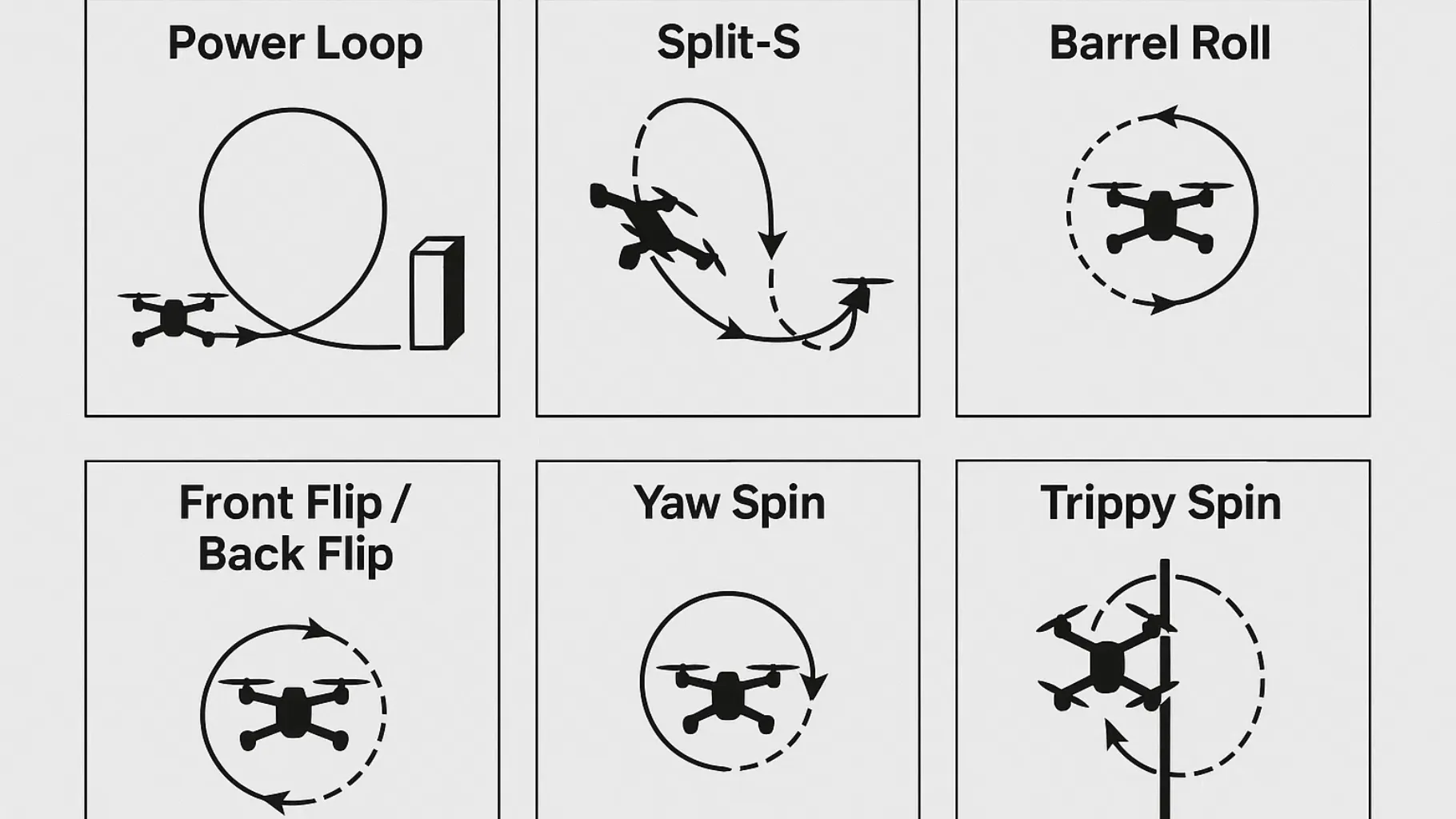
Here are some essential tricks that every beginner should practice, along with tips for learning them.
Snap Roll or Axial Roll
What it is: A snap roll rotates the quad 360 degrees around its longitudinal roll axis and exits on the original heading. FPV pilots often call this a barrel roll, but a true barrel roll follows a helical path and combines roll with a larger arcing trajectory.
Mode 2 stick sequence:
- Fly level at moderate speed with generous altitude.
- Add a brief throttle bump if you need extra clearance.
- Ease the throttle down as you command firm left or right roll with the right stick.
- Release the roll stick as the horizon returns to level.
- Add throttle smoothly to catch any altitude loss and continue the line.
Common failure: Holding high throttle through the inverted portion drives the quad toward the ground. Another common error is releasing the roll stick late, then counter-steering aggressively and creating a wobble.
Practice benchmark: Complete 16 of 20 rolls with the exit heading inside a visual corridor about one gate-width wide. Repeat in both directions before adding proximity.
Backflip and Front Flip
What they are: A flip is a rapid 360-degree rotation around the pitch axis. Backflips usually feel easier because the sky appears first and the horizon returns in a familiar direction. Front flips can feel more disorienting because the ground fills the image early.
Mode 2 stick sequence:
- Begin level and high enough to make a calm recovery.
- Add a small throttle bump to create clearance.
- Reduce throttle and move the pitch stick fully back for a backflip or fully forward for a front flip.
- Center pitch as the horizon becomes level.
- Feed in throttle to stop the descent without ballooning upward.
Common failure: The pilot uses partial pitch, stretches the maneuver, loses the visual reference, and then adds too much throttle. Use a decisive rotation input and a deliberate release.
Practice benchmark: Perform five backflips and five front flips with no extra half-rotation, no oscillating correction, and a controlled exit.
Controlled Yaw Spin
What it is: A yaw spin rotates the quad around its vertical axis. It looks simple, but it exposes poor throttle control and teaches the pilot to stop a rotation on a chosen heading.
Mode 2 stick sequence:
- Slow to a controlled cruise or near-hover at safe altitude.
- Hold enough throttle to support the quad.
- Move the yaw stick left or right while keeping roll and pitch corrections small.
- Center yaw before the desired heading; the exact lead depends on yaw rate and momentum.
- Resume forward flight rather than pausing to search for orientation.
Common failure: Yawing during fast forward flight changes where the camera points but does not instantly redirect momentum. The quad may continue sliding sideways. Learn the difference between heading and flight path before combining yaw spins with proximity.
Split-S
What it is: A Split-S combines a 180-degree roll to inverted with a descending half-loop. It reverses direction and always trades altitude for speed.
Mode 2 stick sequence:
- Enter straight and level with substantially more altitude than you think you need.
- Lower throttle and roll exactly 180 degrees to inverted.
- Center roll, then pull back on pitch to begin the descending half-loop.
- Keep throttle low while the thrust vector points downward.
- As the nose approaches the exit horizon and the quad becomes upright, add throttle progressively.
- Exit in the opposite direction from entry.
Common failure: Starting too low is not recoverable with better stick work. If the ground arrives before the horizon, the maneuver began without enough space. A crooked half-roll also turns the Split-S into a diagonal dive.
Practice benchmark: Mark an entry line and an exit line in the simulator. Complete 16 of 20 attempts while exiting upright, traveling in the opposite direction, and staying inside the planned corridor.
Power Loop
What it is: A power loop is a vertical loop that carries the quad over an object or reference point and returns it to the original direction. A clean power loop is shaped by entry speed, pitch rate, and throttle timing, not by holding full throttle around an entire circle.
Mode 2 stick sequence:
- Approach the reference object straight, level, and at moderate speed.
- Add throttle and pull back on pitch to convert forward speed into an upward arc.
- Continue the back-pitch input as the camera moves from the object to sky.
- Reduce throttle near the top and through the inverted portion.
- Keep the pitch arc continuous. Look for the far side of the reference object as it returns to view.
- Add throttle progressively on the lower upright portion to catch the quad and exit on the original heading.
Common failure: If the object disappears to one side, the entry was not square or roll/yaw leaked into the loop. If the quad overshoots far behind the object, reduce entry speed, loop radius, or early throttle. If it clips the bottom, begin higher or start the catch earlier.
Simulator drill: Start with an imaginary object and a large loop. Then use a wide gate or tree with generous clearance. Tightening the loop before the path is repeatable creates blind collisions.
Immelmann Turn
What it is: An Immelmann is the ascending counterpart to a Split-S: fly a half-loop upward, then roll 180 degrees to exit upright in the opposite direction at a higher altitude.
Mode 2 stick sequence:
- Enter with enough speed and open sky above.
- Add throttle and pull back on pitch through an ascending half-loop.
- Reduce throttle as the quad reaches the inverted top.
- Apply a 180-degree roll to return upright.
- Center the sticks and set the exit throttle.
Common failure: Rolling before the half-loop reaches the top produces a corkscrew instead of a clean reversal. Separate the two phases at first; blend them only after both are consistent.
FPV Dive and Pullout
What it is: A dive uses gravity and a low-throttle descent to track down a vertical surface or open line, followed by a planned pitch-out and throttle catch.
Mode 2 stick sequence:
- Inspect the entire line before committing, including the pullout area.
- Move past the top edge, reduce throttle, and pitch down until the target face is visible.
- Use small roll and yaw corrections to keep the intended exit centered.
- Begin the pitch-out earlier than the video image suggests; FPV perspective compresses distance.
- Add throttle as the quad rotates upright and thrust can arrest the descent.
- Exit away from the structure, not toward people, roads, windows, or vehicles.
Common failure: Punching throttle while still steeply nose-down accelerates the quad into the surface. Pitch establishes the exit direction; throttle then powers the pullout.
Inverted Yaw Spin
What it is: An inverted yaw spin combines a half-roll or half-flip, a yaw rotation while the quad is inverted or near-inverted, and a controlled return upright. It is the bridge between basic rotations and inverted object-based tricks.
Mode 2 stick sequence:
- Create altitude with a small pop.
- Reduce throttle and rotate to inverted.
- Apply yaw while using small roll and pitch corrections to hold the visual reference.
- Keep positive throttle very low while fully inverted because normal FPV quads do not produce upward thrust in that attitude.
- Rotate upright and catch with throttle.
Common failure: The pilot tries to “hover upside down.” A conventional fixed-pitch FPV quad cannot sustain a stationary inverted hover unless it is configured for bidirectional 3D thrust. The freestyle maneuver depends on momentum and a brief low-throttle inverted phase.
Juicy Flick
What it is: “Juicy flick” is a style term rather than one standardized competition maneuver. It generally describes an aggressive pitch-led flick to an inverted look-back, followed by a reversal or flowing exit that keeps the subject in frame.
How to learn it: First practice a pop, a fast half-flip to inverted, a brief look-back, and a clean upright recovery in open air. Add yaw or roll only after the pitch timing is repeatable. The most important visual goal is keeping the subject framed; the exact stick mix changes with entry direction, camera angle, and desired exit.
Common failure: Treating the juicy flick as a random full-stick snap creates a disorienting tumble. Build it from a controlled inverted look-back rather than trying to copy a stick overlay without understanding the entry and exit.
Trippy Spin
What it is: A trippy spin is an advanced inverted-looking orbit around a vertical object. The pilot blends roll, yaw, pitch, and throttle so the object remains near a fixed point in the camera view while the quad travels around it.
Learning progression:
- Fly upright orbits in both directions.
- Practice inverted yaw spins in open air.
- Orbit a tall simulator object at a wide radius with a low camera angle.
- Blend matching roll and yaw while making small pitch corrections to keep the object centered.
- Tighten the radius only after altitude and framing are stable.
Common failure: Excessive roll makes the quad fall into the object; excessive yaw turns the camera without producing the required circular path. A trippy spin is a coordinated orbit, not a yaw spin performed next to a pole.
Intermediate to Advanced Tricks of FPV Freestyle
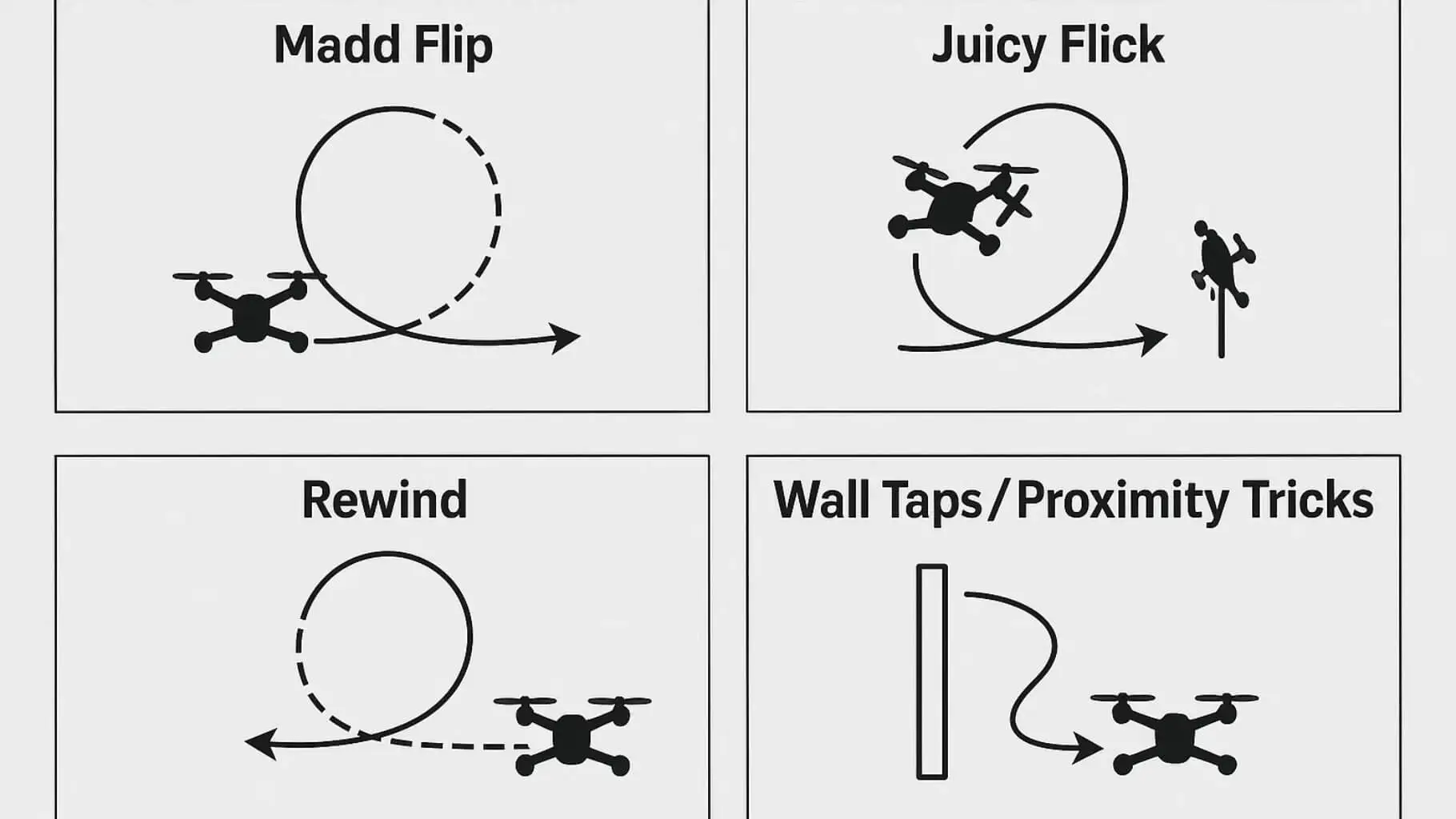
Once you’re confident with the basics, try progressing to these more complex tricks that require better stick control, coordination, and spatial awareness:
Matty Flip
What it is: A Matty flip is an advanced backward loop around an object. In the common object-based version, the quad passes over an obstacle, pitches forward into the reverse path, and uses carefully timed power to travel backward beneath or around the obstacle before recovering. The trick is widely attributed to pilot MattyStuntz.
Learning progression:
- Master the power loop, inverted yaw reference, backward recovery, and dive pullout.
- In the simulator, practice a large backward loop in open space without an object.
- Add a wide, soft-edged reference object and keep the loop far away from it.
- Gradually bring the reference closer only after the entire object remains visible and the exit is predictable.
- Attempt the real-world version only where a failed loop cannot hit a person, vehicle, building, or inaccessible roof.
Common failure: Treating the Matty flip as an unspecified mix of roll, pitch, and yaw produces a tumble rather than a repeatable line. The defining mechanic is the backward loop relative to an object, and the exact stick mix depends on the entry, obstacle, and planned exit.
Rewind and Wall-Tap Variations
Rewind: The word “rewind” is used for several visual reversals. It usually means reversing a recent arc or rotation so the second movement appears to undo the first. Define the exact entry and exit in the tutorial video or caption rather than presenting “rewind” as one universal stick sequence.
Wall tap or wall bonk: This is intentional contact with a surface, often using a prop guard, arm, or part of the frame to redirect the quad. It is an advanced contact trick, not a beginner proximity drill. Practice the timing in a simulator and do not attempt it on people, occupied property, vehicles, glass, or surfaces you do not have permission to use.
Juicy Flick
Often seen in “juicy-style” flying, this is a quick snap in one direction followed by an immediate flick back the opposite way. It mimics a whip or snap and adds rhythm to your freestyle flow. Use fast roll and pitch inputs with subtle throttle adjustments.
Simulator Tip: Practice short back-and-forth movements in open space. Use high camera angle and aggressive rates. Try pairing flicks with throttle blips.
How to Build Freestyle Combos and Flow
A combo works when the first trick ends in the attitude, speed, and direction needed by the next trick. Do not connect moves merely because their names sound good.
Start with these low-complexity combinations:
- Roll to Split-S: finish the roll level, create a short setup line, then reverse direction with a Split-S.
- Power loop to yaw turn: exit the loop level, bleed speed, and use a controlled yaw turn to reframe the object.
- Dive to roll: complete the pullout first, then roll on a clear horizontal exit line.
- Immelmann to dive: use the high exit of the Immelmann to establish a deliberate dive line.
Use the following flow rule: one setup, one trick, one clean exit. When that is repeatable, use the exit as the next setup. Choppy freestyle often comes from starting the next move before the previous rotation has stopped.
A Repeatable 30-Minute Practice Session
Practice quality matters more than total stick time. A focused session can use this structure:
| Block | Time | Goal |
| Warm-up | 5 minutes | Figure eights, altitude changes, and clean stops |
| Single trick | 10 minutes | One maneuver, both directions where applicable |
| Target drill | 5 minutes | Repeat the same entry and exit corridor |
| Two-trick combo | 5 minutes | Link only two mastered movements |
| Review | 5 minutes | Watch DVR, record misses, change one variable |
Log 20 attempts for the trick you are training. Record:
- Clean completions.
- Unplanned altitude loss or gain.
- Heading error at the exit.
- Panic corrections or recovery-mode use.
- Contact, disarm, or simulator reset.
Move the trick from simulator to an open real-world field only after at least 16 of 20 attempts are clean. Move it closer to an object only after two separate sessions meet that threshold. This is a conservative training rule, not a guarantee of safety.
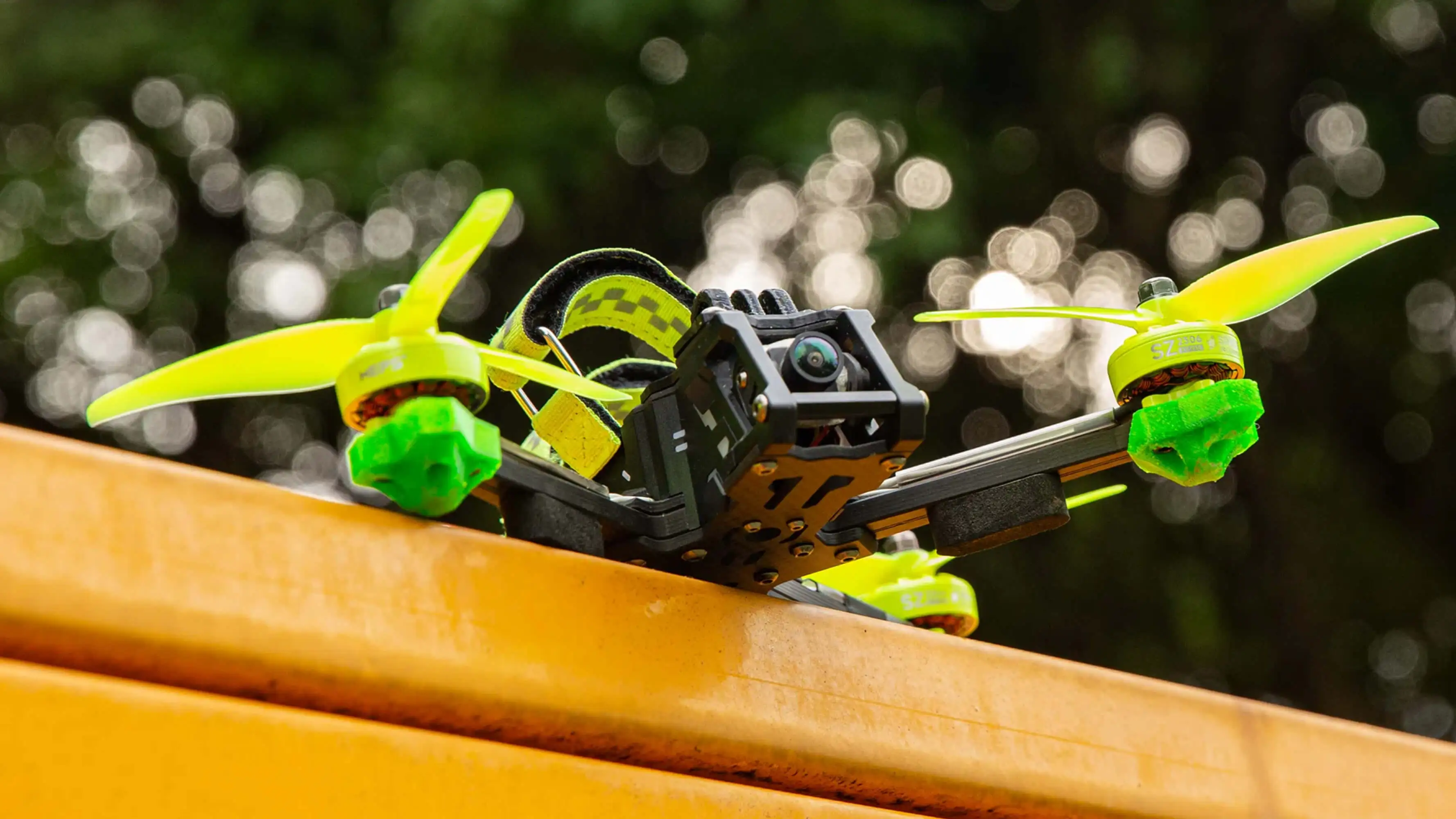
Pre-Flight Checklist
Before attempting any freestyle tricks, make sure your quad is in perfect flying condition. A quick pre-flight checklist not only reduces crashes but also keeps you, your gear, and the environment safe.
Inspect the Frame and Arms
Check for cracks, loose screws, or bent carbon plates. Freestyle puts a lot of stress on arms and standoffs, so ensure everything feels rigid and secure.
Tighten All Propellers
Props must be firmly installed with no wobble. Loose propellers can cause mid-air desyncs, loss of thrust, and severe crashes during power-loops or flips.
Battery Is Securely Mounted
Ensure the battery strap and non-slip pad hold the LiPo tightly. A shifting battery dramatically affects balance and may unplug your quad during aggressive maneuvers.
Check Motors for Smooth Rotation
Spin each motor by hand. They should turn smoothly with no grinding noises. Dirt, sand, or bent shafts will affect your performance and can cause vibration oscillations during tricks.
Confirm VTX Settings & Antenna Security
- Make sure the VTX antenna is tightly screwed in
- Select a legal frequency and power
- Avoid overheating by allowing airflow around the VTX
Verify Receiver and Failsafe Settings
Test radio link quality and ensure failsafe is set to “drop” (not “fly away”).
This is critical when performing high dives, matty flips, or proximity moves.
Check GPS Lock (If Equipped)
For long-range or location-sensitive flights, confirm proper satellite lock before take-off.
Inspect the Flying Area
- No people, cars, animals, or private property
- Enough vertical and horizontal space
- Avoid flying near water unless you’re prepared to lose the quad
Arm → Hover Test → Quick Line Check
Before full throttle freestyle:
- Do a low hover
- Test roll, pitch, yaw
- Check for drifting or oscillations
- Ensure your video feed is clean and stable
A solid pre-flight check adds safety and dramatically improves your freestyle confidence.
Common Mistakes & How to Fix Them (Upgraded Version)
Below is a professional, clear, beginner-friendly table of the most frequent freestyle issues and how to correct them.
Extra Tips to Reduce Mistakes
- Fly the same line repeatedly to build muscle memory
- Review your DVR flight footage after practice
- Practice the trick in a simulator before trying it in real life
- Reduce camera tilt if you feel “too fast.”
- Increase rates gradually as your skill improves
Common Mistakes of FPV Freestyle and How to Avoid
Every pilot makes mistakes, but recognizing them is the key to improvement:
- Overcorrecting Mid-Trick: Let the drone complete its motion before making recovery inputs.
- Unstable Throttle: Use expo or throttle curves to gain finer control at low stick positions.
- Skipping the Basics: Don’t rush into advanced moves — they rely on strong fundamentals.
- Unsafe Practice Zones: Always fly in wide-open or legal areas to reduce risk.
| Mistake | Why It Happens | How to Fix It |
|---|---|---|
| 1. Over-Throttling During Tricks | Beginners panic when losing altitude and give too much throttle, causing the quad to shoot upward or destabilize. | Practice low-throttle cruising. Use simulator drills for flips and power-loops. Focus on “smooth, progressive throttle” instead of punching it. |
| 2. Losing Orientation Mid-Flip or Roll | Camera tilt is too high, rotation speed too fast, or pilot stops looking at a fixed reference point. | Reduce camera angle (20–25°). Slow down rates slightly. Practice flips using a single tree or object as a visual anchor. |
| 3. Wobbles or Oscillations | Loose props, bent motor shaft, bad tune, damaged propellers. | Replace props, check motors, tighten screws. Re-apply a basic PID tune or lower filters if needed. |
| 4. Drifting During Power Loops | Incorrect pitch timing or misaligned entry angle. | Start with larger loops. Aim at a far visual target. Work on smoother pitch control instead of jerking the stick. |
| 5. Unstable Yaw Spins | Yaw rate is too low or the pilot’s throttle control is inconsistent. | Increase yaw rates slightly. Practice low-altitude hover yaw turns before full spins. |
| 6. Crashing During Matty Flips | Wrong throttle drop timing, approaching obstacle too fast, or insufficient backward pitch control. | Practice in a simulator first. Approach slower. Focus on “drop → reverse pitch → recover” timing. |
| 7. Bad Flow / Choppy Lines | Pilot performs tricks individually instead of linking movements. | Practice combining two simple tricks (e.g., roll → split-S). Focus on smooth transitions and consistent forward momentum. |
| 8. Poor Proximity Control | Fear of obstacles or lack of fine throttle control. | Start far away. Get comfortable keeping altitude steady. Gradually move closer to objects as your comfort builds. |
| 9. Video Noise or Signal Dropouts | Damaged antenna, incorrect VTX channel, blocked line-of-sight. | Replace or secure antenna. Choose a clean channel. Avoid flying behind buildings or metal structures. |
| 10. Over-Correcting Stick Inputs | Pilot reacts too quickly or too strongly during maneuvers. | Increase expo. Practice slow, deliberate stick movements. Record DVR to analyze inputs afterward. |
FAQ
How to fly FPV smoothly?
Practice throttle control, use expo settings on your transmitter, and fly in simulators to build muscle memory.
How fast is FPV freestyle?
Freestyle isn’t about max speed. Speeds can range from 30 to 100+ km/h depending on the move, but control is the priority.
What is the best way to learn FPV flying?
Start with simulators like Liftoff or Velocidrone. Then practice with a durable 5-inch quad in open fields. Watch pro pilot videos to learn flow and creativity.
What FPV trick should a beginner learn first?
Learn a snap roll and backflip first. They teach decisive rotation, throttle unloading, horizon recognition, and a clean stop without requiring an object. After both are repeatable, learn the Split-S and then the power loop.
How long does it take to learn FPV freestyle?
There is no reliable hour count because radio setup, simulator quality, prior RC experience, practice frequency, and risk tolerance differ. Use performance gates instead of time: 16 clean attempts out of 20, controlled exits, and no panic recovery is more useful than saying a trick takes a certain number of hours.
Should I cut throttle during flips and rolls?
Reduce or unload throttle through the inverted phase on a conventional fixed-pitch quad. Positive thrust points toward the ground while the quad is upside down. Add throttle progressively as the aircraft returns upright. The exact amount depends on the quad and the maneuver.
What camera angle is best for beginner freestyle?
Start around 15 to 25 degrees. A lower angle makes speed and altitude changes easier to read. Increase the angle only when you consistently fly faster and find yourself looking at too much ground during normal forward flight.
What Betaflight rates are best for FPV freestyle tricks?
There is no universal best rate. With Actual rates, a beginner can start near 700 to 850 deg/s for roll, 650 to 800 deg/s for pitch, and 550 to 700 deg/s for yaw, then adjust gradually. Betaflight notes that established freestyle pilots commonly use higher maximum rates around 850 to 1,200 deg/s.
Can I learn freestyle in Angle or Horizon mode?
Basic orientation can be learned in stabilized modes, but repeatable freestyle should be practiced in Acro/Rate mode because the quad must hold non-level attitudes and respond predictably through inverted transitions.
Is a 5-inch drone required for freestyle?
No. Tiny whoops and 3- to 3.5-inch quads can perform many of the same foundational tricks. A 5-inch quad offers more momentum and power but also creates more risk, noise, repair cost, and regulatory obligations.
Why does my power loop not return to the same spot?
The most common causes are a crooked entry, inconsistent pitch rate, too much early throttle, or a late catch. Practice large loops around an imaginary reference, keep the pitch arc continuous, and change only one variable after reviewing DVR.
What is the difference between a Matty flip and a power loop?
A power loop is a forward-flight vertical loop that normally exits in the original direction. A Matty flip is a backward-looping object maneuver in which the quad travels over and then backward around or beneath the reference. The Matty flip requires stronger inverted and backward-flight awareness.
What is the safest way to practice proximity tricks?
Use a simulator first, then a forgiving obstacle in a legal open area with no people or property at risk. Begin with a wide path, define an abort direction, and tighten the line only after two separate sessions meet a repeatability threshold.